> ## Documentation Index
> Fetch the complete documentation index at: https://docs.contexaai.com/llms.txt
> Use this file to discover all available pages before exploring further.
# What is MCP?
> Model Context Protocol - easiest way to connect your agents to tools and external APIs
## Overview
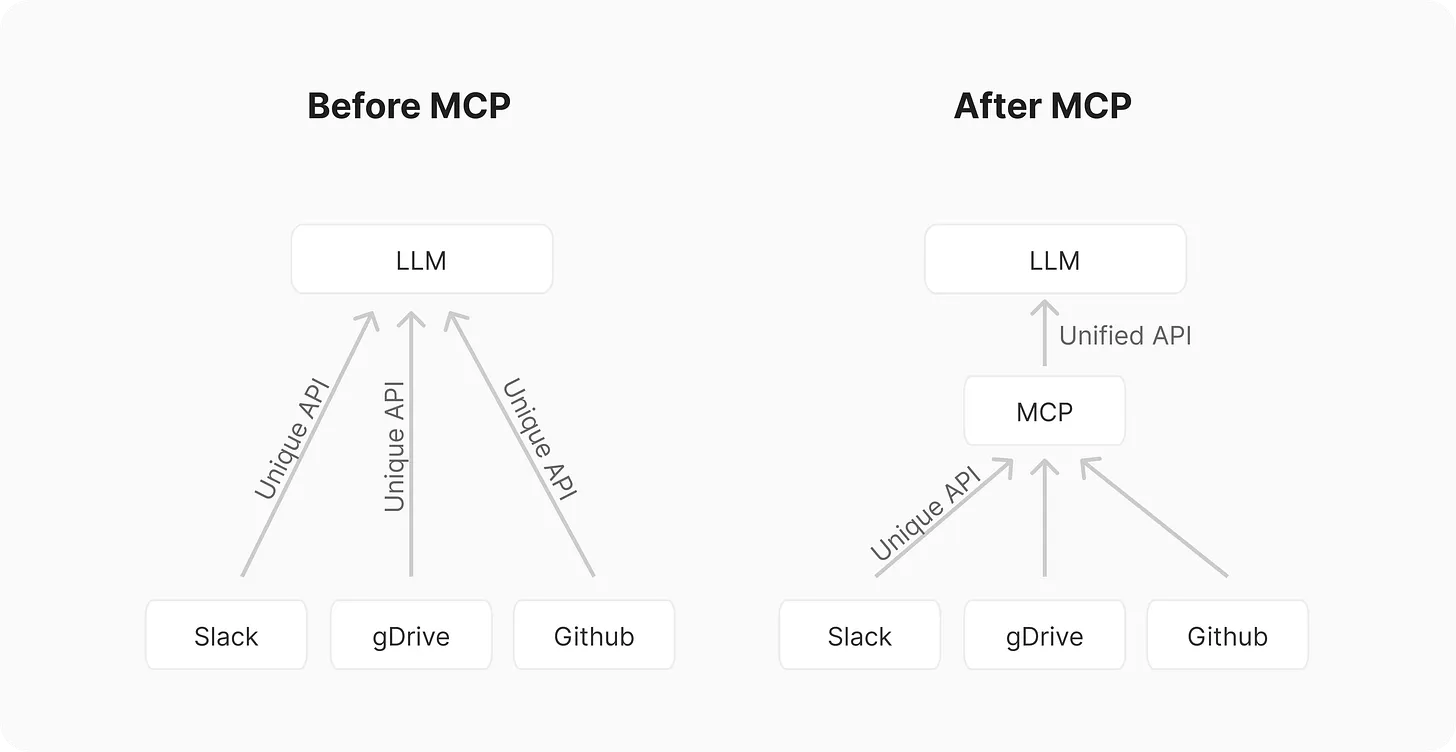
The [**Model Context Protocol (MCP)**](https://modelcontextprotocol.io/docs/getting-started/intro) is an open, vendor-neutral spec that lets any AI agent call any tool or data source through a uniform JSON/HTTP interface—think *USB-C for AI*. By standardising the handshake, auth, and invocation format, MCP removes the bespoke glue code that normally couples each model to every integration. Today the protocol is already baked into [**OpenAI’s Responses API**](https://platform.openai.com/docs/guides/tools-remote-mcp), [**Microsoft Copilot Studio**](https://www.microsoft.com/en-us/microsoft-copilot/blog/copilot-studio/introducing-model-context-protocol-mcp-in-copilot-studio-simplified-integration-with-ai-apps-and-agents/), [**Google Gemini CLI**](https://cloud.google.com/blog/products/ai-machine-learning/build-multilingual-chatbots-with-gemini-gemma-and-mcp), and dozens of third-party servers listed in Anthropic’s directory. ContexaAI sits on top of this ecosystem, giving you a one-click way to create, deploy, and compose MCP servers so your agents can focus on reasoning, not plumbing.
 ## What exactly *is* MCP?
### Definition & spec
MCP is a **JSON-RPC–style protocol** that defines:
* **Handshake** – the client announces supported schema versions & authentication; the server returns its *tool manifest* (functions, arguments, docs). ([*Links*](https://github.com/modelcontextprotocol/modelcontextprotocol)*)*
* **Roots** – optional scoped access boundaries that tell a server which files, databases or tenants it may touch.
* **Invocation** – a single `/invoke` endpoint where the client calls a tool with structured arguments and receives a typed response or stream.
* **Auth & consent** – layered around OAuth 2 / JWT plus an optional *consent* step so users can selectively grant tools.
If you’ve ever written a bespoke “/v1/tools/slack.postMessage” wrapper for each model: MCP turns that into one declarative row in a manifest.
## Why you should care
| Pain today | MCP advantage |
| :--------------------------------------- | :------------------------------------------------------------------ |
| Re-implement every integration per model | **Write once, reuse everywhere** (ChatGPT, Copilot, Gemini, Claude) |
| Drift between dev & prod schemas | **Schema-version pinning** in handshake |
| Messy auth flows | **Standard auth layer** with OAuth, consent tokens |
| Limited observability | **Typed logs & streaming** built into protocol |
## How it works (architecture)
1. **AI agent client** (e.g., OpenAI Responses) starts a *handshake* with the **MCP server** announcing schema & auth.
2. Server replies with a **tool manifest**—each tool has `name`, `description`, `parameters`, and optional `auth` requirements.
3. Client calls `/invoke` with tool name + JSON args.
4. Server executes underlying integration (Slack API, GitHub REST, database query) and streams the result back.
5. Optional **roots** limit what the server can access, enforcing least-privilege.
[**ContexaAI**](https://www.contexaai.com/) generates the manifest, bundle tools, handle auth, and host the server so you only point your agent at a single URL.
## ContexaAI + MCP
With ContexaAI you can:
| Step | Contexa feature | MCP outcome |
| :---------------------------- | :--------------------------------------- | :--------------------------------------- |
| **Convert** your OpenAPI spec | One-click generator | Ready-to-use tool manifest |
| **Compose** bundles | Mix Slack, GitHub, custom SQL tool | Single server with multiple namespaces |
| **Deploy** | Managed infra, observability, versioning | Secure public endpoint |
| **Test** | Chat Playground & traces | Validate arguments & streaming responses |
**Bottom line:** spend minutes, not weeks, wiring your agents to 3000+ tools or your own APIs - without touching DevOps.
## What exactly *is* MCP?
### Definition & spec
MCP is a **JSON-RPC–style protocol** that defines:
* **Handshake** – the client announces supported schema versions & authentication; the server returns its *tool manifest* (functions, arguments, docs). ([*Links*](https://github.com/modelcontextprotocol/modelcontextprotocol)*)*
* **Roots** – optional scoped access boundaries that tell a server which files, databases or tenants it may touch.
* **Invocation** – a single `/invoke` endpoint where the client calls a tool with structured arguments and receives a typed response or stream.
* **Auth & consent** – layered around OAuth 2 / JWT plus an optional *consent* step so users can selectively grant tools.
If you’ve ever written a bespoke “/v1/tools/slack.postMessage” wrapper for each model: MCP turns that into one declarative row in a manifest.
## Why you should care
| Pain today | MCP advantage |
| :--------------------------------------- | :------------------------------------------------------------------ |
| Re-implement every integration per model | **Write once, reuse everywhere** (ChatGPT, Copilot, Gemini, Claude) |
| Drift between dev & prod schemas | **Schema-version pinning** in handshake |
| Messy auth flows | **Standard auth layer** with OAuth, consent tokens |
| Limited observability | **Typed logs & streaming** built into protocol |
## How it works (architecture)
1. **AI agent client** (e.g., OpenAI Responses) starts a *handshake* with the **MCP server** announcing schema & auth.
2. Server replies with a **tool manifest**—each tool has `name`, `description`, `parameters`, and optional `auth` requirements.
3. Client calls `/invoke` with tool name + JSON args.
4. Server executes underlying integration (Slack API, GitHub REST, database query) and streams the result back.
5. Optional **roots** limit what the server can access, enforcing least-privilege.
[**ContexaAI**](https://www.contexaai.com/) generates the manifest, bundle tools, handle auth, and host the server so you only point your agent at a single URL.
## ContexaAI + MCP
With ContexaAI you can:
| Step | Contexa feature | MCP outcome |
| :---------------------------- | :--------------------------------------- | :--------------------------------------- |
| **Convert** your OpenAPI spec | One-click generator | Ready-to-use tool manifest |
| **Compose** bundles | Mix Slack, GitHub, custom SQL tool | Single server with multiple namespaces |
| **Deploy** | Managed infra, observability, versioning | Secure public endpoint |
| **Test** | Chat Playground & traces | Validate arguments & streaming responses |
**Bottom line:** spend minutes, not weeks, wiring your agents to 3000+ tools or your own APIs - without touching DevOps.